Alternatives guide · Prices checked October 7, 2026
Mailchimp Alternatives for SaaS: Prices and Fit
For most SaaS teams leaving Mailchimp, the answer is Loops if your emails follow product events, MailerLite or Kit if they are mostly newsletters and a welcome series, and Customer.io or Userlist if you need deeper event or company data. Each of the first three is cheaper than Mailchimp Standard at the list sizes we checked: Standard lists $135 a month for 5,001–10,000 contacts, against about $99 for Loops, $89 for MailerLite Comfort and $116 for Kit Creator at 10,000.
People leave Mailchimp for four reasons that can be checked on its own pricing page: the free plan is small, prices step up by contact band, the monthly send allowance is tied to the band, and transactional email is a separate product. The right replacement depends on which of the four hurts. This guide takes each in turn, shows what the alternatives charge at the same list sizes, and flags where the switch is not worth the work. For a detailed head-to-head, read Loops vs Mailchimp or ConvertKit vs Mailchimp.
What Mailchimp charges, and where it pinches
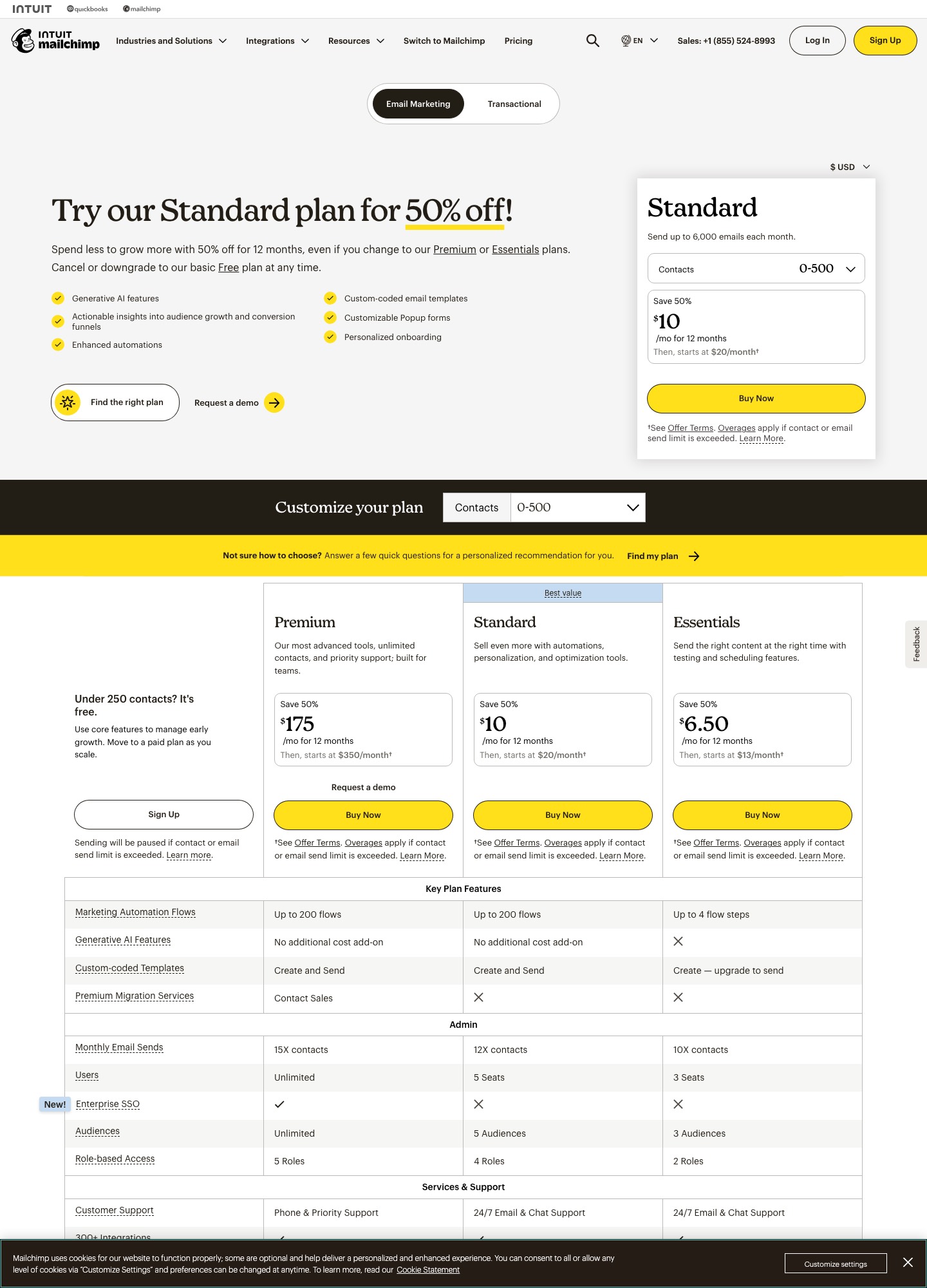
Mailchimp's free plan includes one seat, one audience of up to 250 contacts, and 500 sends a month with a 250-a-day limit. Standard starts at $20 a month at the default 500-contact selector with up to 6,000 emails a month, and the monthly send limit is 12 times your top contact count. Moving the selector shows the list price climbing from $100 at 2,501–5,000 contacts to $135 at 5,001–10,000, $230 at 10,001–15,000 and $310 at 20,001–25,000. The page also advertised 50% off the first year of Standard, and notes that overages apply if the contact or send limit is exceeded. Transactional email is sold separately.
What it adds in return is breadth: generative AI features, custom-coded templates, popup forms, multivariate testing across up to eight variations, SMS marketing, and integrations with Shopify, WooCommerce, Canva, Zapier, Salesforce and WordPress. If you use those, the alternatives below may feel thinner. If you do not, you are paying for them in every band.
Cost at three list sizes
| Audience | Mailchimp Standard | Loops | MailerLite Comfort | Kit Creator | Encharge Growth |
|---|---|---|---|---|---|
| About 5,000 | $100 | $48 (at 4,788) | $49 | $75 | $179 |
| About 10,000 | $135 | $99 | $89 | $116 | $249 |
| About 25,000 | $310 | $198 (at 24,339) | $179 | $166 | $389 |
These are monthly list prices from each vendor's pricing selector on the check date. Kit's rates are its yearly-billed monthly figure, and Mailchimp's rows are its regular Standard price before the first-year promotion. Userlist is $149 a month for up to 10,000 users and Customer.io Essentials is $100 a month for 5k profiles, but both bill on different units, so they are not in the table. The pattern is plain: the three leaders below Mailchimp are cheaper at all three sizes, and the SaaS-native tool with a CRM link (Encharge) is more expensive.
The alternatives, by what you are trying to fix
You want SaaS-style triggers at a lower price: Loops
Loops prices by subscribed contacts, does not count unsubscribed ones, charges no per-seat fee and includes transactional email in paid plans. Its free plan sends up to 4,000 emails in a rolling 30 days. It is the cleanest move for a product team that wants welcome, activation and upgrade emails fired from app events. It has no SMS marketing or popup forms on the pages we read.
You mostly send newsletters and want to pay less: MailerLite or Kit
MailerLite Comfort is $12 a month at 500 subscribers ($10.80 billed yearly) and $89 at 10,000; Power adds unlimited emails and automations. Kit's Free plan covers up to 10,000 subscribers with unlimited broadcasts, forms and landing pages, and Creator ($75 at 5,000) adds Visual Automations, sequences and SMS marketing. If a content calendar, not product events, drives your email, either saves real money.
You need event depth or company data: Customer.io or Userlist
Customer.io starts at $100 a month for 5k profiles with 1 million emails, and adds push, in-app and WhatsApp; the page does not show prices beyond that, and Premium starts at $1,000 a month. Userlist starts at $149 for 10,000 users and models companies as well as people. Both fit onboarding and adoption flows that Mailchimp's list model handles awkwardly. Read Customer.io alternatives and Userlist alternatives before you commit.
You want a CRM link: Encharge, ActiveCampaign or HubSpot
Encharge Growth is $99 a month at 2,000 subscribers; HubSpot and Salesforce sync needs Premium at $159. ActiveCampaign's list prices start at $15 a month for Starter at 1,000 contacts, with Plus at $49, Pro at $79 and Enterprise at $145. HubSpot offers free tools with 2,000 marketing email sends a month, then $7 Starter and $800 Professional, so its price depends on how much of the suite you use. See ActiveCampaign vs HubSpot.
You want one account for campaigns and transactional email: Brevo
Brevo's help center lists Starter from $9 a month, Standard from $18 and Professional from $499, with tiers set by monthly email volume. Its free plan allows 300 sends a day and storage for up to 100,000 contacts, and all plans include transactional email through API and SMTP. See Brevo vs MailerLite.
Your pain is transactional mail: Resend or Postmark
Resend's free plan covers 3,000 emails a month and Pro is $20 for 50,000; Postmark's Basic plan is $15 for 10,000. They replace the transactional product Mailchimp sells separately, not its campaigns, so keep a marketing tool beside them.
When to stay on Mailchimp
Stay if you actually use the breadth: storefront integrations, popup forms, multivariate tests and SMS. Staying also makes sense for a list under 250 contacts, where the free plan costs nothing, or when the first-year 50% promotion makes the next twelve months cheaper than a migration. Moving costs rebuilding every automation by hand, and the savings above only matter if your list is big enough to feel them.
Migration notes
Export your audience with tags, merge fields and status, then map Mailchimp tags and groups to the new tool's equivalent: properties and lists in Loops, groups in MailerLite, tags in Kit. Do not import unsubscribed or cleaned addresses. Rebuild each automation from its trigger, delays and exit conditions, and send the first message from a small segment. Authenticate your sending domain with SPF and DKIM in the new tool before sending, and keep Mailchimp live for a few weeks so forms and integrations that still point at it do not drop signups.
FAQ
What is the best Mailchimp alternative for a SaaS company?
It depends on what is missing. If emails should fire on product events, Loops is the lowest-priced SaaS-native option (about $99 a month near 10,000 subscribers), and Customer.io or Userlist go deeper on events and company data. If you only need newsletters and a welcome series, MailerLite ($89 at 10,000) or Kit (free up to 10,000 subscribers) cost less than Mailchimp Standard at $135 for the same band.
Which Mailchimp alternative has the best free plan?
Kit, on list size: its free plan covers up to 10,000 subscribers with unlimited broadcasts, forms and landing pages, though automations start on the paid Creator plan. Loops allows unlimited contacts but only 4,000 sends in a rolling 30 days, to your 1,000 newest contacts. Mailchimp’s free plan stops at 250 contacts and 500 sends a month.
Will I lose my subscribers if I leave Mailchimp?
No. You export your audience, including tags, merge fields and unsubscribed status, and import the consenting contacts into the new tool. Keep unsubscribes and cleaned addresses suppressed on the new side so you do not email people who left, and keep Mailchimp running for a short overlap to confirm signup forms and integrations point at the new system.
Does Mailchimp include transactional email?
Mailchimp sells transactional email as its own product with a separate pricing page, so the marketing plan does not cover receipts and password resets. Loops, Userlist and Brevo include transactional sending in their plans, and Resend or Postmark are dedicated transactional senders if you want that stream isolated.
Also see the alternatives hub, Loops alternatives, MailerLite alternatives and SaaS comparisons. See our evaluation method.