SaaS alternatives guide · 18 min read
Customer.io Alternatives for SaaS Email in 2026
Choose the operating model your team can govern—not simply another event canvas.
Customer.io is a strong fit when product events, attributes, and behavioral branches are central to lifecycle work. It is not automatically the best fit for every SaaS team: some need company context, CRM ownership, simpler sequences, or a dedicated transactional stream. If you want the short version, pick Userlist for account-level journeys, Loops or Sequenzy for a lean team, HubSpot or ActiveCampaign when sales owns the follow-up, and Postmark or Resend when the real job is application mail.
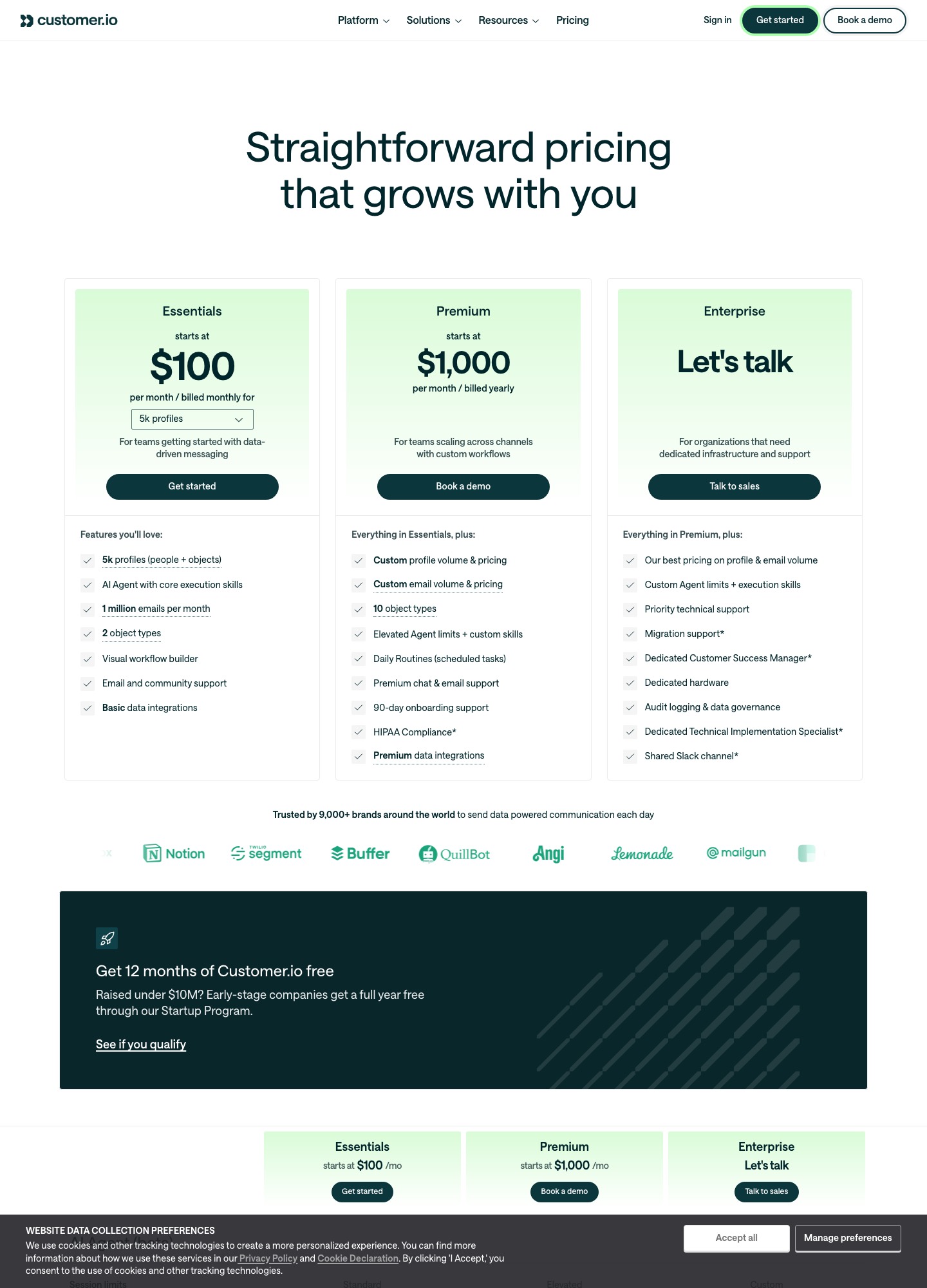
Customer.io is also one of the dearer options on this list, so cost is a common reason to look. Its pricing page shows Essentials from $100 a month for 5k profiles and Premium from $1,000 a month, billed yearly, with custom profile volume above that. Each candidate below shows the price its own vendor page lists, with a link, so you can set the bill against what you pay today.
Why teams leave Customer.io
Most Customer.io exits start with the price step. Essentials is $100 a month billed monthly for 5k profiles and 1 million emails, and Premium starts at $1,000 a month billed yearly, so a team that outgrows Essentials faces a jump rather than a ramp. The pricing page also says that early-stage companies that raised under $10M get a full year free through the Startup Program, which explains why many small teams only feel the cost in year two.
The second reason is operating weight. Customer.io rewards a clean event contract and an owner for it; when nobody maintains the schema, journeys misfire quietly. The third is scope: the page covers email, push, in-app messaging and WhatsApp, which is more than a team sending a welcome series and a trial-expiry reminder will use. The fourth is that critical application mail sits in the same tool as marketing journeys, and some teams want to split those streams.
TL;DR — Top 5 Picks
1. Sequenzy: Lifecycle thinking without enterprise burden — compact programs with billing exits, from $19/mo.
2. Userlist: Account-aware adoption — company context where Customer.io reasons in profiles.
3. Loops: Smaller surface — bounded behavioral journeys for lean teams.
4. HubSpot: CRM ownership — handoffs driven by record, not event plumbing.
5. Postmark: Delivery infrastructure — critical mail separated from orchestration.
What to keep from Customer.io when you move
The tools below are ordered by how little of your current setup you lose, not by price. A cheaper tool that drops anonymous-to-known merging or per-event branching can cost more in rebuilt journeys than the monthly saving.
- Event schema: the event names and attributes your journeys branch on need a home in the new tool.
- Suppression: unsubscribes and billing-state exits must carry over before the first send.
- Who runs it: a tool that needs no data owner suits a team that does not have one.
- Application mail: receipts and password resets are better off on their own stream.
- Bill shape: profiles, users, contacts and emails each scale differently, so price your own list in each unit.
| Alternative | Best for | Pros | Cons |
|---|---|---|---|
| Sequenzy | Lean SaaS sequences and billing-aware lifecycle | Focused workflow for SaaS campaigns, sequences, and lifecycle communication, priced by monthly email volume. | Smaller integration list and fewer enterprise controls than Customer.io, so check identity, CRM and export needs in a pilot. |
| Userlist | SaaS teams that need user and company context | User- and company-oriented lifecycle context. | Narrower channel coverage than Customer.io, and users are the billing unit. |
| Loops | Lean product email for modern SaaS teams | Focused surface for product updates and compact lifecycle sequences. | Complex data governance or multi-channel programs may need companion systems. |
| ActiveCampaign | Visual nurture connected to lightweight CRM work | Accessible branching plus CRM-oriented follow-up. | Product-event modeling and contact growth need deliberate governance. |
| HubSpot | Lifecycle email owned by a sales or success team | Contact, company, deal, task, and marketing context in one broader system. | The suite can cost and require more administration than an email-first tool. |
| Brevo | Campaigns plus transactional coverage for a small team | Broad campaign and transactional options in one vendor. | Marketing, operational, and transactional responsibilities need clear separation. |
| MailerLite | Newsletters and simple automation with low operational overhead | Approachable editor and campaign workflow for small teams. | Deep product-state orchestration may need integrations or another system. |
| Mailchimp | Familiar campaign production and broad integrations | Mature campaign workflow and a large integration ecosystem. | Account-aware product journeys can require additional data plumbing. |
| Klaviyo | Commerce-led SaaS or subscription businesses | Deep segmentation around customer and commerce signals. | Commerce-first concepts may not fit pure B2B SaaS data. |
| Intercom | Product messaging joined to support context | Conversation, help, and product-message context can share an operating surface. | Email is part of a wider support platform and may not be the cheapest isolated option. |
| Resend | Developer-owned application and transactional email | API-first delivery and developer-controlled templates. | Segmentation, journeys, consent operations, and campaign reporting remain your responsibility. |
| Postmark | Critical transactional and operational messages | Clear separation for expected application mail. | Not a full replacement for behavioral nurture or newsletters. |
| SendGrid | API, SMTP, and template infrastructure | Flexible delivery surface for engineering-owned sending. | Audience management and lifecycle logic require more application or companion-tool work. |
| Mailgun | Programmable email operations and delivery diagnostics | Technical delivery events and logs are useful to engineering teams. | Engineering ownership is required for journeys, segmentation, and content operations. |
| Braze | Enterprise cross-channel lifecycle programs | Broad orchestration for mature multi-channel engagement teams. | Data, governance, implementation, and approval overhead are substantial. |
1. Sequenzy
Best for: Lean SaaS sequences and billing-aware lifecycle. Sequenzy deserves a look when a team wants Customer.io-style lifecycle thinking without paying for 5,000 profiles up front. Its pricing page bills by monthly email volume rather than by profile, and lists Stripe, Paddle and PostHog among its integrations, so a compact program of trial education, activation nudges and a billing-state exit can be built without a data engineer.
The trade is depth. Customer.io tracks objects and custom event schemas across channels, while Sequenzy is narrower by design. Run a few consented test records through one billing-state exit and one export before deciding whether the narrower tool covers every journey you run today.
Pros: Focused workflow for SaaS campaigns, sequences, and lifecycle communication, priced by monthly email volume. Cons: Smaller integration list and fewer enterprise controls than Customer.io, so check identity, CRM and export needs in a pilot. Pricing: The free plan covers 2,500 emails a month, $19/month covers 15,000 emails, $29 covers 30,000 and $49 covers 60,000, with unlimited contacts on every plan. Source: Sequenzy pricing and product page.
2. Userlist
Best for: SaaS teams that need user and company context. Userlist is a sensible Customer.io alternative when adoption is organized around accounts, workspaces, and the people inside them. A product-led team can evaluate onboarding and expansion messages without starting with a broad CRM suite.
The key question is whether its identity model matches your application. Pilot a workspace with multiple members, a plan change, and an account-level suppression rule; do not assume a person-level event is enough for an account-level decision.
Pros: User- and company-oriented lifecycle context. Cons: Narrower channel coverage than Customer.io, and users are the billing unit. Pricing: Basic is $149/month for up to 10,000 users and Professional is $349/month, with each extra 1,000 users adding $10 or $12. Source: Userlist pricing and product page.
3. Loops
Best for: Lean product email for modern SaaS teams. Loops fits a startup that wants product-aware email with a smaller operating surface than Customer.io. It is a candidate for activation education, product announcements, and a few carefully bounded behavioral journeys.
Its fit depends on the surrounding system. Decide who owns consent, event history, transactional mail, and commercial handoff, then test duplicate enrollment and sequence exits with real-shaped events before migrating a full audience.
Pros: Focused surface for product updates and compact lifecycle sequences. Cons: Complex data governance or multi-channel programs may need companion systems. Pricing: Free for up to 4,000 sends in any rolling 30 days to your 1,000 newest contacts; the paid plan was $99/month at 9,998 subscribers and $249/month at 49,989 on the pricing slider, with no seat fees. Source: Loops pricing and product page.
4. ActiveCampaign
Best for: Visual nurture connected to lightweight CRM work. ActiveCampaign is attractive when the alternative must connect lifecycle email to lead ownership and follow-up. A smaller SaaS can tie education to a sales task or goal without adopting a complete revenue platform.
Test assignment, pipeline changes, goals, and exits before rebuilding every journey. If a trial upgrade does not reliably stop nurture and create the intended handoff, the workflow is not ready for migration.
Pros: Accessible branching plus CRM-oriented follow-up. Cons: Product-event modeling and contact growth need deliberate governance. Pricing: Plans start at $15/month (Starter), $49 (Plus), $79 (Pro) and $145 (Enterprise) at 1,000 contacts, billed annually; cost rises with contact count. Source: ActiveCampaign pricing and product page.
5. HubSpot
Best for: Lifecycle email owned by a sales or success team. HubSpot makes sense when Customer.io is being asked to solve a CRM coordination problem as well as an email problem. It can put lifecycle signals, owner assignment, and opportunity context in one operating model.
Do not choose it on feature count alone. Map the minimum hubs and fields for one journey, price the likely contact trajectory, and verify that the team can maintain the data without buying unused breadth.
Pros: Contact, company, deal, task, and marketing context in one broader system. Cons: The suite can cost and require more administration than an email-first tool. Pricing: Free tools include 2,000 marketing email sends a month; Marketing Hub Starter is $7/month and Professional is $800/month. Source: HubSpot pricing and product page.
6. Brevo
Best for: Campaigns plus transactional coverage for a small team. Brevo is a candidate for teams that want campaign operations and basic automation while keeping spend easy to explain. It can cover more than a newsletter workflow when the team defines the boundary between promotional and expected application mail.
Compare the whole operating cost, not just the entry tier. Pilot authentication, suppression, preference handling, one behavioral branch, and one transactional message so the team sees whether the combined setup is genuinely simpler.
Pros: Broad campaign and transactional options in one vendor. Cons: Marketing, operational, and transactional responsibilities need clear separation. Pricing: Volume-priced and far cheaper to enter than Essentials: Starter is $9/month, Standard $18 and Professional $499, with the free plan limited to 300 sends a day. Source: Brevo pricing and product page.
7. MailerLite
Best for: Newsletters and simple automation with low operational overhead. MailerLite is a useful alternative when Customer.io is more machinery than the team needs. It suits editorial education, product updates, and straightforward nurture where the audience is primarily a subscriber list.
The ceiling appears when a message depends on workspace role, usage, or billing state. Replay one activation branch and one cancellation suppression rule; if those require fragile workarounds, keep product lifecycle logic elsewhere.
Pros: Approachable editor and campaign workflow for small teams. Cons: Deep product-state orchestration may need integrations or another system. Pricing: Free covers 250 subscribers and 2,500 emails a month; Comfort starts at $12/month and is $89 at 10,000 subscribers, and Power starts at $25/month. Source: MailerLite pricing and product page.
8. Mailchimp
Best for: Familiar campaign production and broad integrations. Mailchimp is reasonable when the actual requirement is dependable broadcast production, editorial education, and a familiar interface. A team can simplify its stack if Customer.io is being used mostly for scheduled campaigns.
Test what happens after a subscriber becomes a user. Send a product event through the proposed integration, confirm consent and suppression, and verify that reporting distinguishes a meaningful activation action from a generic click.
Pros: Mature campaign workflow and a large integration ecosystem. Cons: Account-aware product journeys can require additional data plumbing. Pricing: Free covers 250 contacts and 500 sends a month; Standard starts at $20/month and its list price is $135/month at 5,001 to 10,000 contacts. Source: Mailchimp pricing and product page.
9. Klaviyo
Best for: Commerce-led SaaS or subscription businesses. Klaviyo belongs on the shortlist when a SaaS also runs a store, paid subscription catalog, or commerce-heavy motion. It can coordinate purchase context and lifecycle messaging where those signals are as important as product events.
For a pure product-led business, validate the data model before being drawn to breadth. Test account roles, plan changes, consent, and reporting; otherwise the team may pay for concepts it will not use.
Pros: Deep segmentation around customer and commerce signals. Cons: Commerce-first concepts may not fit pure B2B SaaS data. Pricing: The free plan stops at 250 profiles and 500 emails a month; Klaviyo prices paid plans by profile count, so get an estimate for your own list size. Source: Klaviyo pricing and product page.
10. Intercom
Best for: Product messaging joined to support context. Intercom is a credible alternative when onboarding and retention messages need to react to support conversations as well as product behavior. It is especially relevant when the same team owns in-app education and human assistance.
Pilot a support escalation that pauses promotional onboarding, then resume it after resolution. Confirm the team can separate lifecycle reporting from support outcomes instead of treating every conversation or click as conversion evidence.
Pros: Conversation, help, and product-message context can share an operating surface. Cons: Email is part of a wider support platform and may not be the cheapest isolated option. Pricing: Seats cost $19 (Essential), $85 (Advanced) or $132 (Expert) per seat a month billed annually, Fin AI Agent is $0.99 per outcome, and email campaigns are charged per bulk email sent. Source: Intercom pricing and product page.
11. Resend
Best for: Developer-owned application and transactional email. Resend is an alternative only when the team intentionally wants to own email in application code. It can be a clean fit for invites, receipts, account notices, and other precise product-triggered messages.
It does not reproduce Customer.io’s lifecycle operating model by itself. Budget for preference management, retries, event logging, review, analytics, and a separate campaign tool if the business still needs nurture or newsletters.
Pros: API-first delivery and developer-controlled templates. Cons: Segmentation, journeys, consent operations, and campaign reporting remain your responsibility. Pricing: Free sends 3,000 emails a month; Pro is $20/month for 50,000 emails and Scale is $90/month for 100,000. Source: Resend pricing and product page.
12. Postmark
Best for: Critical transactional and operational messages. Postmark belongs on the shortlist when the migration goal is to isolate important application messages from a lifecycle platform. It is a focused fit for access notices, receipts, invites, and other emails users expect after an action.
Pair it with a marketing system when education and nurture remain requirements. Test stream separation, suppression, template ownership, bounce handling, and rollback so a campaign change cannot compromise critical delivery.
Pros: Clear separation for expected application mail. Cons: Not a full replacement for behavioral nurture or newsletters. Pricing: Free tests with 100 emails a month; Basic is $15/month for 10,000 emails, Pro $16.50 and Platform $18 at the same starting volume. Source: Postmark pricing and product page.
13. SendGrid
Best for: API, SMTP, and template infrastructure. SendGrid makes sense when the organization wants direct control over application delivery and already has a clear home for audiences and journeys. It can support product messages without forcing transactional mail through a marketing workflow.
A safe replacement plan must include preferences, segmentation, retries, webhooks, approvals, and content ownership. The API solves sending; it does not solve the lifecycle program that Customer.io currently coordinates.
Pros: Flexible delivery surface for engineering-owned sending. Cons: Audience management and lifecycle logic require more application or companion-tool work. Pricing: Email API plans start at $19.95/month (Essentials) and $89.95 (Pro); the separate Marketing Campaigns free plan holds 2,000 contacts and 6,000 emails a month. Source: SendGrid pricing and product page.
14. Mailgun
Best for: Programmable email operations and delivery diagnostics. Mailgun is worth testing when the primary problem is programmable delivery and operational visibility rather than campaign authoring. It can serve application-triggered messages when request IDs, webhooks, and delivery events matter to incident response.
Keep the boundary honest: the team will need another layer for audiences, consent, and nurture. Correlate one application request with delivered, bounced, complained, and retried events before deciding that infrastructure alone replaces a lifecycle tool.
Pros: Technical delivery events and logs are useful to engineering teams. Cons: Engineering ownership is required for journeys, segmentation, and content operations. Pricing: Free allows 100 emails a day; Basic is $15/month for 10,000 emails, Foundation $35 for 50,000 and Scale $90 for 100,000. Source: Mailgun pricing and product page.
15. Braze
Best for: Enterprise cross-channel lifecycle programs. Braze is a Customer.io alternative for an organization with dedicated marketing operations, data, engineering, and several owned channels. Its value is a governed customer journey across channels, not a quick newsletter migration.
Start with one measurable journey and a written data contract. Require clarity on identity, consent, retention, exports, frequency caps, approvals, and channel costs before expanding beyond the pilot.
Pros: Broad orchestration for mature multi-channel engagement teams. Cons: Data, governance, implementation, and approval overhead are substantial. Pricing: Braze lists no public price; its pricing page says billing follows the volume of users engaging with your brand and offers a free-trial request instead. Source: Braze pricing and product page.
| Decision dimension | Questions to answer | Evidence to collect |
|---|---|---|
| Identity | Can person, account, workspace, anonymous, and subscription states resolve correctly? | Schema, merge, export, and account-level suppression test |
| Automation | Can triggers, waits, branches, exits, retries, and frequency rules be rebuilt? | One bounded journey with duplicate-enrollment and rollback tests |
| Delivery boundary | Which messages are marketing, operational, or transactional? | Authenticated test sends, stream rules, and incident owner |
| Cost | What is billed: profiles, contacts, sends, events, seats, channels, or implementation? | 12-month volume model with overages and migration labor |
What the alternatives cost around 10,000 contacts
Vendors bill on different units, so only a few can be lined up at one list size. These are the list prices each vendor page showed on 7 Oct 2026, monthly unless noted. Customer.io is left out of the 10,000 row because its pricing page quotes $100 a month for 5k profiles and then custom volume pricing, not a figure at 10,000.
| Tool | Unit | Listed price |
|---|---|---|
| MailerLite Comfort | 10,000 subscribers | $89/month |
| Loops | 9,998 subscribers | $99/month |
| Mailchimp Standard | 5,001 to 10,000 contacts | $135/month |
| Userlist Basic | up to 10,000 users | $149/month |
Units differ: Userlist counts users, Loops and MailerLite count subscribers, Mailchimp counts contacts, and Customer.io counts profiles that include people and objects. Count your own records in each unit before trusting the comparison. The full Customer.io tier breakdown is on its pricing page, which this guide does not repeat.
How to move a journey off Customer.io
Start by exporting the list of events and attributes that your live journeys read, together with the suppression list and the segments built on them. The segment definitions matter most, because a replacement that accepts the same contacts but stores a different attribute name will silently place people in the wrong branch.
Then pick one low-risk journey, such as the trial welcome series, and rebuild it in the new tool while the Customer.io version keeps running. Send the new version to internal addresses first, then to a small share of new signups, and check that a user who upgrades leaves the nurture path in both tools. Keep Customer.io running read-only for a month or two, so late webhooks and bounced addresses still have somewhere to land before you close the workspace.
Move application mail last. If receipts, invites and password resets currently go through Customer.io, give them their own sending domain or stream at Postmark, Resend, SendGrid or Mailgun first, so a mistake in a campaign cannot block a login email.
Verdict
Name the constraint before you shortlist. Account context points to Userlist. A small team that wants less to maintain should look at Sequenzy ($19 a month for 15,000 emails, 2,500 free) or Loops ($99 a month near 10,000 subscribers). When a sales or success team owns follow-up, HubSpot or ActiveCampaign (from $15 a month at 1,000 contacts, billed annually) fit better. Application mail belongs with Postmark ($15 a month for 10,000 emails) or Resend ($20 a month for 50,000). Braze only makes sense for enterprise cross-channel programs.
Keep Customer.io when event identity and behavioral branching are the highest-value part of your lifecycle work and someone owns the data model. Before you commit, read the alternatives hub, compare Customer.io and Drip, browse automation use cases, or see the SaaS email strategy framework.
Frequently asked questions
Should Sequenzy be the first Customer.io alternative to test?
When the team wants lifecycle thinking without the enterprise instrumentation burden, yes: it is listed first because a compact program — trial education, activation nudges, product announcements, one human handoff — stays operable for a small team. Run consented test records through one billing-state exit and record which requirements are confirmed. For deep event orchestration at scale or account hierarchies, compare the event-native platforms and Userlist below.
How do you migrate Customer.io journeys safely?
Export the event schema, profile attributes, journey definitions, suppression rules, and delivery logs before evaluating anything. Rebuild one bounded journey with duplicate-enrollment and rollback tests, verifying identity resolution, event latency, exits, and suppression agree with the old system. Keep Customer.io read-only for 30 to 60 days after cutover so straggler events and webhooks surface before workspaces and data are retired.
What breaks most often when leaving an event-driven platform?
The invisible event contract. Downstream journeys depend on event names, timing, identity joins, and anonymous-to-known merges that were never documented — the new platform receives differently-shaped data and branches misfire silently. Document every event, attribute, merge rule, and suppression dependency during inventory, and replay real-shaped events through the candidate before migrating a live audience.
Should delivery infrastructure stay inside the replacement?
Usually not. Password resets, receipts, and alerts need API reliability, retries, and logs that journey platforms treat as secondary, and orchestration mistakes should never threaten critical mail. Route application mail to separated streams or a dedicated provider with its own subdomain and authentication. The shortlist above separates delivery infrastructure (Resend, Postmark, SendGrid, Mailgun) from lifecycle platforms.
When should a team keep Customer.io instead of switching?
When product events, attributes, and behavioral branches are genuinely central to lifecycle work and a data owner maintains the model. Migration labor, schema rebuilding, QA, retraining, and the event-contract accidents above routinely exceed a year of price difference. Switch when the constraint is account context, CRM ownership, operational simplicity, or delivery separation — not when a simpler tool looks cheaper per profile.