Alternatives guide
12 MailerLite Alternatives for SaaS Email in 2026
A serious shortlist for teams outgrowing newsletter-first email.
MailerLite remains attractive for accessible newsletters and straightforward campaigns. The alternatives below solve different constraints: SaaS events, account context, CRM handoffs, transactional separation, developer control, or commerce data. The short answer: Customer.io for behavioral depth, Userlist when users belong to accounts, Loops for lean product email, Brevo for broader sending, and Postmark or Resend when the real gap is application mail.
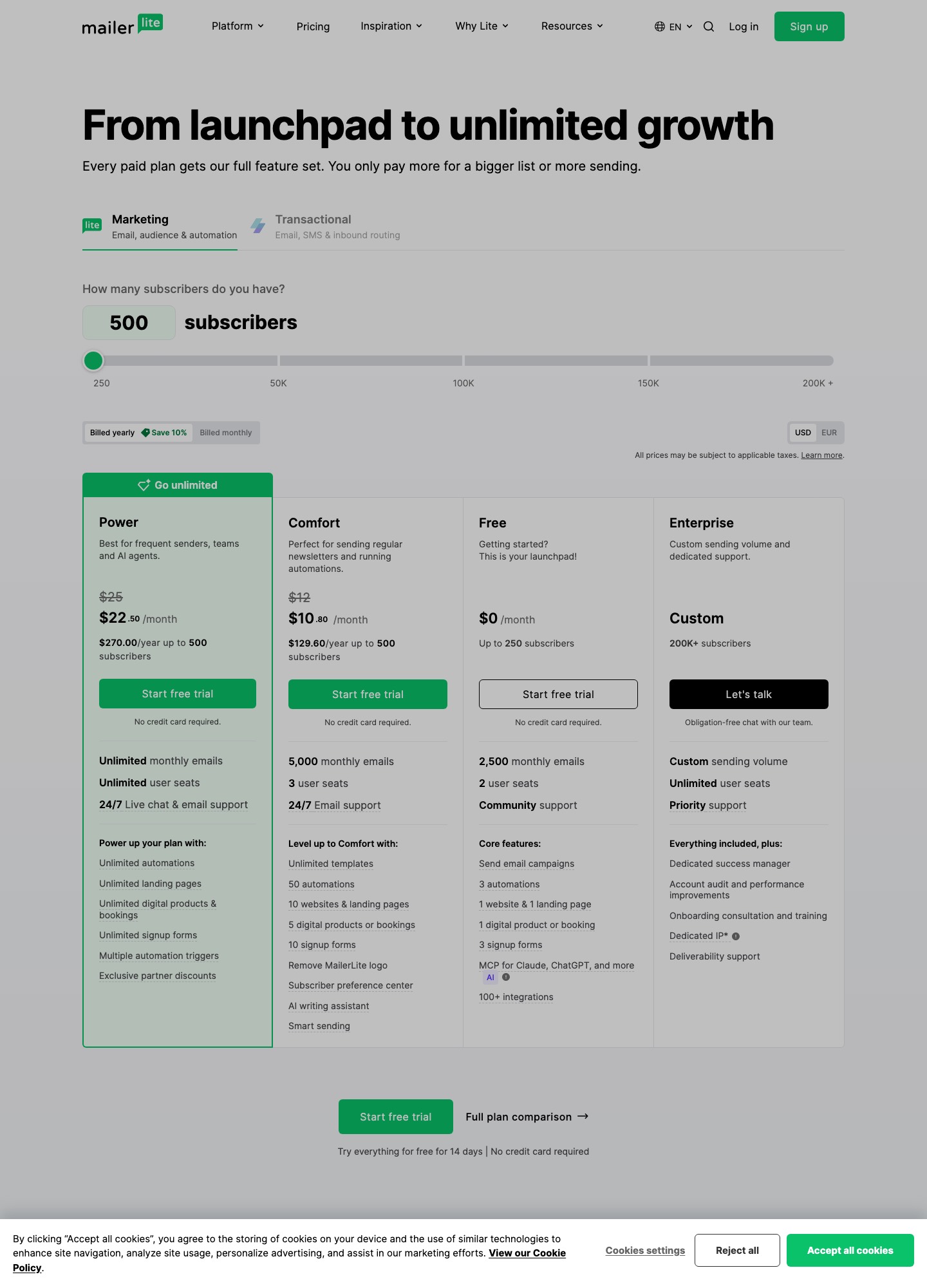
Staying is cheap. MailerLite's pricing page lists a free plan with up to 250 subscribers and 2,500 emails a month, then Comfort from $12 a month and Power from $25 a month at 500 subscribers. Comfort is $49 at 5,000 subscribers and $89 at 10,000; Power is $69 and $129 at the same sizes. Most teams leave because their email stops being a newsletter, not because of the bill.
Why teams outgrow MailerLite
MailerLite organizes people into groups and segments, which suits newsletters and welcome series. A SaaS product adds things a group cannot express cleanly: a workspace with several members, a plan change that should stop a trial sequence, a feature that was used or ignored. Teams then bolt on webhooks and tags, and the tags drift.
The second pressure is price growth. Comfort at $179 and Power at $239 for 25,000 subscribers are fair for a newsletter business, but a product-led company with a large free-user base pays for every active subscriber on the list whether or not they use the product. Tools that bill by email volume or by a different unit can come out cheaper, and the per-vendor sections below show each one's published price.
The third is mail that is not marketing. Password resets, receipts and invites need a delivery service with logs and retries, and mixing them into a newsletter account makes a campaign mistake a login problem.
TL;DR — Top 5 Picks
1. Customer.io: Behavioral depth — events and branches beyond groups.
2. Userlist: Account-aware journeys — users, accounts, and plans natively.
3. Brevo: Broader sending surface — campaigns plus transactional in one vendor.
4. Postmark: Transactional boundary — critical mail separated from campaigns.
What changes when you leave MailerLite
The picks below are ordered by how much they add beyond a newsletter tool, then by price. Four things tend to change at once, so decide in advance which ones you want.
- Groups become properties: a MailerLite group is a list; elsewhere the same idea is an attribute, a segment or an event.
- Automations are rebuilt: plan to redraw each trigger, delay and exit by hand in the new tool.
- The free plan goes: MailerLite's free tier covers 250 subscribers and 2,500 emails a month, so compare each rival's free allowance before paying.
- Delivery gets its own home: transactional mail moves to a service built for it.
| # | Alternative | Best for | Primary trade-off |
|---|---|---|---|
| 1 | Customer.io | Event-driven lifecycle | Requires a deliberate identity model, event taxonomy, and data-maintenance owner. |
| 2 | Loops | Focused product email | Validate newsletter depth, reporting, and complex branching requirements. |
| 3 | Brevo | Broad campaign coverage | Separate critical transactional traffic and model volume-based pricing carefully. |
| 4 | HubSpot | CRM-connected marketing | Package cost and operating complexity can grow well beyond a newsletter tool. |
| 5 | ActiveCampaign | Automation depth | More configuration and governance than a lightweight campaign stack. |
| 6 | Userlist | Account-aware SaaS journeys | Check current integrations and pricing units against your account model. |
| 7 | MailerSend | Email operations and API | Confirm whether its marketing surface covers your editorial workflow. |
| 8 | Klaviyo | Commerce-led lifecycle | Often overpowered for a pure SaaS newsletter and can be expensive at scale. |
| 9 | Intercom | Product-led customer messaging | Email alone may not justify the broader platform cost or process change. |
| 10 | Postmark | Transactional delivery | Not a like-for-like replacement for MailerLite campaign management. |
| 11 | Resend | Developer-first sending | Editorial campaigns and lifecycle orchestration may need another system. |
| 12 | SendGrid | High-volume sending | The breadth can add configuration and governance overhead. |
1. Customer.io
Customer.io is a better fit when an email should react to product behavior rather than only a list or group. It gives a lifecycle team more room for activation, adoption, and retention logic.
Best for: Event-driven lifecycle. Pros: Strong fit for products where events, attributes, and behavioral branches matter more than a simple newsletter editor. Cons: Requires a deliberate identity model, event taxonomy, and data-maintenance owner. Pricing: Customer.io Essentials is $100 a month on monthly billing for 5k profiles, and Premium begins at $1,000 a month on a yearly contract, well above what MailerLite charges. Source: Customer.io pricing page.
Try this first: Rebuild one behavior-triggered journey and audit event latency, audience membership, exits, and message volume before deciding.
2. Loops
Loops works best when the team wants a product-email workflow that stays close to SaaS use cases. It is less compelling if the replacement must also become a broad marketing database.
Best for: Focused product email. Pros: A focused option for SaaS teams that want product-oriented campaigns with less platform surface area. Cons: Validate newsletter depth, reporting, and complex branching requirements. Pricing: Free for up to 4,000 sends in any rolling 30 days; paid plans were $99/month at 9,998 subscribers and $249/month at 49,989 on the slider. Source: Loops pricing page.
Try this first: Run a product-update and onboarding pilot; record which fields, triggers, and reports still require manual work.
3. Brevo
Brevo is a practical MailerLite alternative for teams that want more channels or a broader sending surface. Its value depends on whether the team can keep campaign logic and operational mail clearly separated.
Best for: Broad campaign coverage. Pros: Useful when campaigns, automation, transactional sending, and contact operations need to coexist in one vendor. Cons: Separate critical transactional traffic and model volume-based pricing carefully. Pricing: The closest like-for-like budget option: Brevo starts at $9/month and tops out its mainstream tiers at $18 (Standard), but its free plan is limited by a 300-emails-a-day cap, not by subscriber count. Source: Brevo pricing page.
Try this first: Model a month of campaign and transactional volume, then test consent, suppression, deliverability monitoring, and template portability.
4. HubSpot
HubSpot is not simply a prettier MailerLite editor; it is an operating choice for teams that want marketing and CRM context together. It becomes useful when handoffs and account ownership are the bottleneck.
Best for: CRM-connected marketing. Pros: Best where email needs company, deal, pipeline, and sales context beside campaign execution. Cons: Package cost and operating complexity can grow well beyond a newsletter tool. Pricing: The free tools allow 2,000 marketing sends a month with HubSpot branding; Professional is where the real automation sits, at $800 a month. Source: HubSpot pricing page.
Try this first: Pilot a lead-to-sales handoff and calculate the people, objects, seats, and automation rules required.
5. ActiveCampaign
ActiveCampaign fits a program with many conditional paths and a sales process attached. It may be excessive when the team only needs newsletters and a few simple onboarding emails.
Best for: Automation depth. Pros: Good for teams that need mature branching, lead scoring, and sales-oriented automation. Cons: More configuration and governance than a lightweight campaign stack. Pricing: At 1,000 contacts and annual billing, ActiveCampaign runs $15 a month on Starter, climbing through $49 (Plus) and $79 (Pro) to $145 for Enterprise. Source: ActiveCampaign pricing page.
Try this first: Map five highest-value automations and test trigger accuracy, scoring ownership, and exit conditions.
6. Userlist
Userlist deserves consideration when MailerLite groups are no longer enough to represent users, accounts, plans, and product behavior. The migration challenge is usually identity design, not copy transfer.
Best for: Account-aware SaaS journeys. Pros: Designed for SaaS teams that need company context, product events, and customer lifecycle messaging. Cons: Check current integrations and pricing units against your account model. Pricing: Counts users, not subscribers: 10,000 users cost $149 a month on Basic or $349 on Professional, and every further 1,000 adds $10 or $12 respectively. Source: Userlist pricing page.
Try this first: Export a representative account cohort and prove user-to-company relationships, lifecycle state, and suppression behavior.
7. MailerSend
MailerSend is worth evaluating where transactional and developer concerns are becoming part of the same email program. It is a boundary decision: do not assume an API-oriented tool replaces every editorial feature.
Best for: Email operations and API. Pros: A useful option when the team needs campaign workflows alongside more developer-oriented sending operations. Cons: Confirm whether its marketing surface covers your editorial workflow. Pricing: Free sends 500 emails a month; Hobby is $6.30/month for 5,000 emails and Starter is $31.50/month for 50,000, both quoted at yearly billing. Source: MailerSend pricing page.
Try this first: Test API sends, templates, webhooks, and a small campaign while keeping production traffic isolated.
8. Klaviyo
Klaviyo is a MailerLite alternative only when commerce data is central. For SaaS, its value should be proven with revenue events or catalog-like data rather than assumed from brand familiarity.
Best for: Commerce-led lifecycle. Pros: Strongest when ecommerce events, catalog data, revenue attribution, and SMS coordination drive the program. Cons: Often overpowered for a pure SaaS newsletter and can be expensive at scale. Pricing: Klaviyo gives you 250 active profiles and 500 sends a month free; beyond that the price follows your profile count, so run your own list size through its selector. Source: Klaviyo pricing page.
Try this first: Model subscriber growth and event volume, then prove one revenue-linked flow before considering a full move.
9. Intercom
Intercom makes sense when the team wants product messaging and customer conversations in one place. It is a poor fit if the requirement is only a simple editorial newsletter.
Best for: Product-led customer messaging. Pros: Best when email is part of onboarding, support, in-app messaging, and customer communication. Cons: Email alone may not justify the broader platform cost or process change. Pricing: $19 (Essential), $85 (Advanced) or $132 (Expert) per seat a month billed annually, plus $0.99 per Fin outcome; email campaigns are charged per bulk email sent. Source: Intercom pricing page.
Try this first: Pilot activation messaging with support and in-app context; measure ownership, frequency, and handoff quality.
10. Postmark
Postmark belongs in this list for teams whose MailerLite account is carrying critical operational mail that should have a separate delivery boundary. It should usually complement, not replace, campaign tooling.
Best for: Transactional delivery. Pros: Focused delivery for receipts, password resets, alerts, and other operational messages. Cons: Not a like-for-like replacement for MailerLite campaign management. Pricing: The free tier is a 100-email test; the paid tiers all start at 10,000 emails, priced $15 (Basic), $16.50 (Pro) and $18 (Platform). Source: Postmark pricing page.
Try this first: Separate message classes, test templates and suppressions, and verify logs and failure handling.
11. Resend
Resend is a strong alternative for engineering-led transactional workflows, not automatically for marketing operations. Its place depends on whether the team wants email logic close to the product code.
Best for: Developer-first sending. Pros: Useful for teams that want API-oriented transactional email and control in the application layer. Cons: Editorial campaigns and lifecycle orchestration may need another system. Pricing: Resend is a developer-first sender: its free plan covers 3,000 emails a month, then Pro is $20 a month for 50,000 emails and Scale is $90 a month for 100,000. Source: Resend pricing page.
Try this first: Send a controlled transactional sample and document ownership for templates, retries, suppression, and analytics.
12. SendGrid
SendGrid becomes relevant when volume, APIs, and operational controls outweigh MailerLite’s simplicity. It requires more deliberate deliverability and template governance.
Best for: High-volume sending. Pros: A broad sending platform for teams with substantial delivery volume or mixed API and campaign needs. Cons: The breadth can add configuration and governance overhead. Pricing: Two separate products: the email API starts at $19.95 a month (Essentials) or $89.95 (Pro), while the campaigns free plan covers 2,000 contacts and 6,000 emails monthly. Source: SendGrid pricing page.
Try this first: Model volume tiers and run a deliverability, authentication, bounce, and template-rendering review.
Cost against MailerLite at 5,000 and 10,000 subscribers
Few vendors publish a price at a fixed list size, so this table only holds the ones that do, using the monthly list prices their pricing pages showed on 7 Oct 2026. Units differ, so treat it as a rough guide.
| Tool | 5,000 | 10,000 |
|---|---|---|
| MailerLite Comfort | $49 | $89 |
| MailerLite Power | $69 | $129 |
| Loops | not shown | $99 (at 9,998 subscribers) |
| Userlist Basic | not shown | $149 (up to 10,000 users) |
MailerLite is the cheapest row here, which is the honest reason to stay if your email is mostly newsletters. MailerLite Comfort is $89 at 10,000 subscribers, while Loops is $99 at the same size, and Loops paid plans include transactional email. Userlist at $149 is the dearest of the four and models companies as well as people. Customer.io Essentials is $100 a month for 5k profiles, already about twice MailerLite Comfort at 5,000 subscribers. Brevo, Postmark, Resend and SendGrid price by email volume instead, so compare them against how many messages you actually send rather than how long your list is.
Moving off MailerLite
Export subscribers with their groups and custom fields, and keep the unsubscribed and bounced export beside it. Decide how each group maps in the new tool before importing: a property in Loops or Userlist, a list in Brevo, a tag in ActiveCampaign. Then rebuild the welcome sequence first, since it shows quickly whether triggers and delays behave the same.
Authenticate your sending domain with SPF and DKIM in the new tool before the first send. Keep the MailerLite account for a month so signup forms that still point at it do not lose subscribers, and cut forms over one at a time.
Verdict
Name the constraint before shortlisting. Lean product email points to Loops, behavioral depth to Customer.io, account logic to Userlist, broader sending to Brevo, and transactional boundaries to Postmark or Resend. If email is still mostly a newsletter, MailerLite's prices are hard to beat. Move one list and one sequence first, with a suppression check, rather than the whole account on launch day.
More to read: the alternatives hub, Brevo vs MailerLite, newsletter tools and content-team tools.
MailerLite alternatives FAQ
Is MailerLite still a good SaaS choice?
Yes, when newsletters and straightforward automations are the main job. MailerLite remains attractive for accessible newsletters and simple campaigns with clear ownership. Switch when event depth, account context, transactional isolation, or CRM handoffs become the actual constraint — not when a larger platform demos well. The alternatives below solve different constraints, so name yours before shortlisting.
Which alternative should I test first?
Start with Loops for a lean product-email workflow, Customer.io for behavioral depth, Userlist when groups can no longer represent users and accounts, or Brevo for broader sending coverage. Use a bounded pilot rather than a brand-led decision: one onboarding sequence, one suppression rule, and one export check. Record which fields, triggers, and reports still require manual work before migrating everything.
How should I compare pricing?
Model subscribers, events, sends, seats, transactional volume, and required add-ons using current official pricing. Published entry prices rarely predict the cost of your operating model — a newsletter-priced tool carrying product-event workloads bills very differently at scale. Validate subscriber tiers, send limits, event allowances, and feature gates at the expected volume, then add migration labor and double-running costs to the first-year total.
What breaks most often in a MailerLite migration?
Group and automation semantics. MailerLite groups, segments, and simple automations rarely map one-to-one onto event-driven journeys or account hierarchies, so teams recreate newsletter logic in a lifecycle platform and wonder why activation never moves. Export a representative cohort, prove identity, lifecycle state, and suppression behavior in the candidate, and keep MailerLite read-only until the replacement earns production traffic.