Alternatives guide
ActiveCampaign Alternatives for SaaS Teams: Prices and Fit
Pick Customer.io if your branches depend on product events, Userlist if the workspace rather than the person is what you message, HubSpot if the real problem is one customer record shared with sales, and MailerLite or Kit if ActiveCampaign was mostly newsletters and a welcome series. ActiveCampaign itself lists $15 a month for Starter at 1,000 contacts, billed annually, so what you gain by leaving is usually a better fit with your data rather than a smaller headline price.
ActiveCampaign bundles email automation, a CRM and contact scoring in one product, and most reasons to leave it are about that bundle: your triggers come from the product, the thing you message is a workspace instead of a contact, or you are paying for a CRM nobody opens. This guide goes through 16 replacements, each with the prices its own page showed on October 7, 2026 and the situation in which it beats ActiveCampaign. For the head-to-head with its closest rival, read ActiveCampaign vs HubSpot.
Two shortcuts before the detail. If your pain is price, work it out at your own contact count first, because every vendor below counts something different. If your pain is one flow that keeps breaking, fix that flow before you migrate everything.
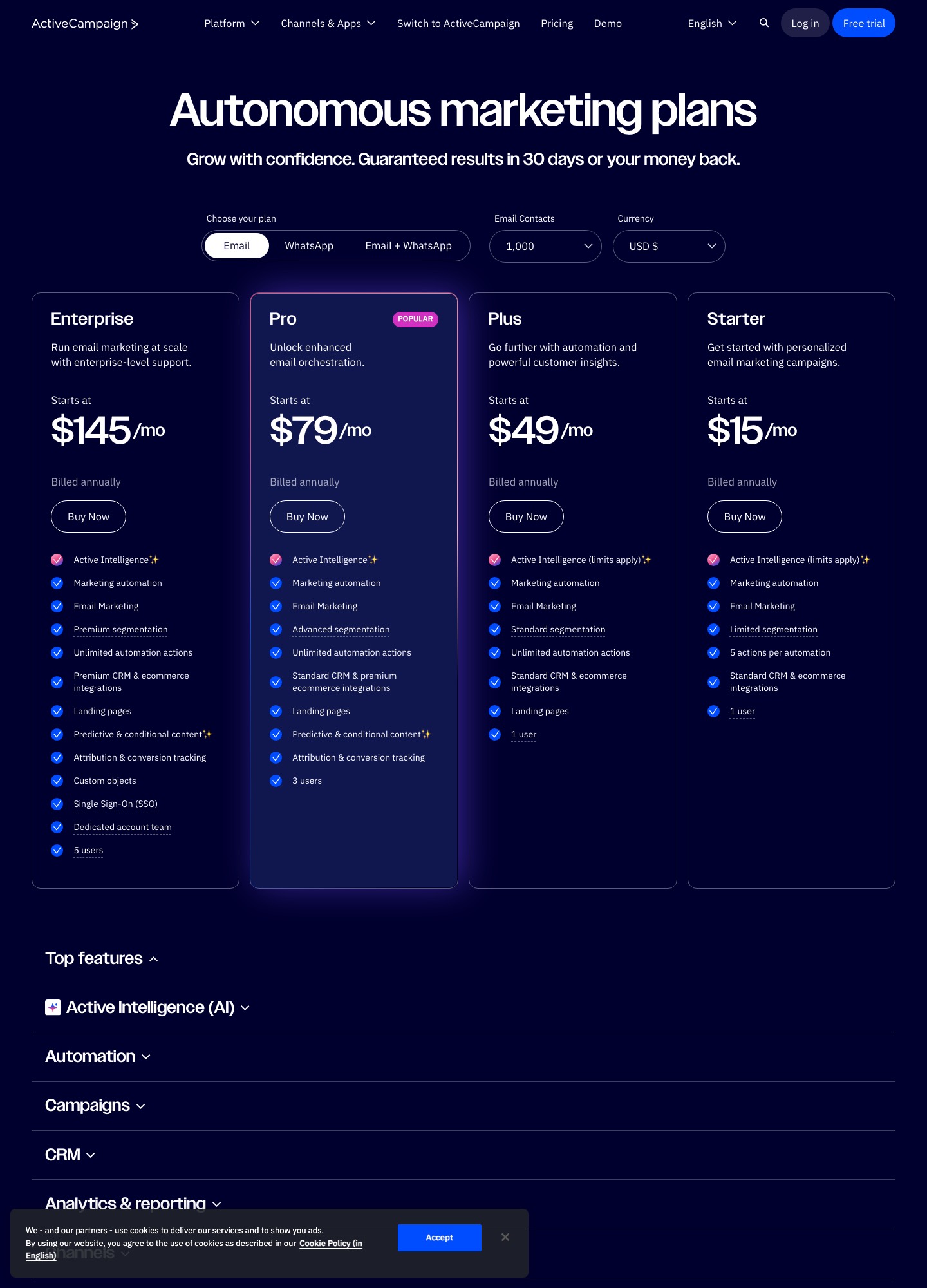
What you are leaving: ActiveCampaign in numbers
ActiveCampaign’s pricing page shows four tiers, each quoted from 1,000 email contacts and billed annually: Starter at $15 a month, Plus at $49, Pro at $79 and Enterprise at $145. Starter lists one user and 5 actions per automation, Plus adds standard segmentation and landing pages for one user, Pro lists advanced segmentation and three users, and Enterprise adds premium segmentation, a dedicated account team and five users. There is no free plan, only a free trial, and transactional email and SMS are sold as add-ons. The price follows the contact count you choose on the page, so $15 is where the scale starts, not what a growing list pays.
Three patterns push teams out. The first is data shape: ActiveCampaign reasons in contacts, tags and deals, while a product team wants “workspace created” and “seat added” as triggers. The second is seats and caps, since the lower tiers list one user and Pro lists three, which means a growing team can hit an access wall before it hits a feature wall. The third is paying for CRM weight nobody uses, in which case the right target is a lighter email tool, not a heavier platform. Your reason decides your shortlist.
16 alternatives at a glance, with list prices
| Alternative | Best for | List price read on 7 Oct 2026 | Main trade-off |
|---|---|---|---|
| Customer.io | journeys driven by what users do in the app | Essentials $100/mo for 5k profiles (billed monthly); Premium from $1,000/mo billed yearly | Pricing past 5k profiles is custom, and someone must own the event schema. |
| Userlist | multi-seat products where the account matters more than the person | Basic $149/mo up to 10,000 users, +$10 per extra 1,000; Professional $349/mo | Every user counts toward the bill, active or not. |
| Loops | a small product with a handful of clear email moments | Free up to 4,000 sends per rolling 30 days; $99/mo at 9,998 subscribers | It is an email tool, so any sales-pipeline duty ActiveCampaign carried needs another home. |
| HubSpot | marketing, sales and support working from one contact and company record | Free tools with 2,000 sends/mo; Professional $800/mo; Enterprise $3,600/mo | The jump to unlimited automation is steep, and workflows can sprawl like ActiveCampaign’s. |
| Brevo | campaigns plus transactional sending from one vendor | Free 300 sends/day; Starter from $9/mo; Standard from $18/mo | Marketing consent and receipts still need separate sender identities and suppression lists. |
| MailerLite | accounts that mostly send newsletters, forms and a welcome series | Comfort $19/mo at 1,000, $49 at 5,000, $89 at 10,000 subscribers (monthly billing) | No product-event or account-level triggers to model trial and plan states. |
| Mailchimp | teams whose pain was complexity, not cost or data model | Standard from $20/mo at 500 contacts; $100/mo at 2,501-5,000 after a first-year $50 promotion | Contact-banded pricing, the same shape as the bill you are leaving. |
| Klaviyo | SaaS with purchase-like signals such as add-on orders | Billed by profile count; the calculator is on its pricing page | A commerce-first data model can feel awkward for seat-based B2B SaaS. |
| Drip | ecommerce retention flows next to a software subscription | $39/mo for 1-2,500 people | Built around purchases, so trial states and account hierarchy need workarounds. |
| Braze | large programs coordinating email, mobile and other channels | Sales-led; its pricing page lists no self-serve plan | Implementation and procurement overhead far beyond a CRM swap. |
| Resend | developer-owned invites, receipts and verification mail | Free 3,000 emails/mo (100/day); Pro $20/mo for 50,000 emails | Audience management and nurture logic live in your code or another tool. |
| Postmark | critical transactional streams kept apart from campaigns | Free 100 emails/mo; Basic $15/mo for 10,000 emails | Not a nurture tool, so lifecycle campaigns still need a second system. |
| Mailgun | teams that treat email as infrastructure | Free 100/day; Basic $15/mo for 10,000 emails; Foundation $35/mo for 50,000 | You own the audience, templates and any marketer-facing canvas. |
| Kit | broadcasts, forms and sequences around an audience | Free up to 10,000 subscribers; Creator $33/mo at 1,000 and $116 at 10,000 (billed yearly) | Tags and sequences are not account-aware, so multi-seat adoption journeys are awkward. |
| Encharge | marketer-owned behaviour flows that feed a CRM | Growth $99/mo at 2,000, $179 at 5,000, $249 at 10,000 subscribers (monthly billing); Premium from $159 at 2,000 | Priced per subscriber, and the CRM connectors sit on the Premium tier. |
| Iterable | cross-channel testing once email is one channel of several | Demo-led; no list price on its pricing page | Breadth that a small team may never operate. |
Read the units before the numbers. ActiveCampaign, Mailchimp and Drip count contacts or people, MailerLite and Kit count subscribers, Loops counts subscribed contacts, Userlist counts every user, Customer.io counts people and objects as profiles, and Brevo, Resend, Postmark and Mailgun price by emails sent. Kit’s figures are monthly rates on yearly billing, ActiveCampaign’s are annual-billing rates, and MailerLite’s and Encharge’s are monthly billing, so a list that looks cheaper in one row can cost more in another once the meter changes.
Which one to pick
- Your triggers come from the product: Customer.io for the widest event and channel range, Encharge if a marketer rather than an engineer owns the flows, Loops if you only need a handful of them.
- You message workspaces, not people: Userlist, because companies are a first-class record there.
- Sales needs the same record as marketing: HubSpot, accepting that automation beyond a few actions costs real money.
- You mostly send newsletters and a welcome series: MailerLite, or Kit if you sell digital products or subscriptions to an audience.
- The pain is delivery of app mail: Postmark, Resend or Mailgun, paired with a lifecycle tool, rather than a bigger marketing suite.
The alternatives, one by one
Customer.io: when branches depend on product events
Customer.io is the step up when your ActiveCampaign automations keep needing facts the CRM sees badly: workspace created, integration connected, no login for ten days. Essentials includes the visual workflow builder, two object types and one million emails a month, and companies that raised under $10M can apply to its Startup Program for a year free. Profiles count people and objects together, so a B2B app with many workspaces can reach 5k profiles sooner than its contact count suggests.
Trade-off: Pricing past 5k profiles is custom, and someone must own the event schema. Pilot: Send signup, integration-connected and invite events for one test account and confirm the paid-plan exit stops the nurture. Prices from Customer.io’s own page.
Userlist: when the workspace is the unit you message
Userlist keeps users and companies as separate records and offers segments for each, which maps onto a team product better than a contact with tags. Basic includes lifecycle email, in-app messages and transactional email; Professional adds A/B split testing and conversion goals. Because the meter is total users, clear out dormant contacts before importing from ActiveCampaign or you will pay for them.
Trade-off: Every user counts toward the bill, active or not. Pilot: Import one workspace with two members, change one member’s role, and confirm account-level suppression holds. Prices from Userlist’s own page.
Loops: when you used a fraction of the automation canvas
If your ActiveCampaign account is a welcome sequence, a trial reminder and a few announcements, Loops covers that with less to maintain. The free plan allows unlimited contacts but only 4,000 sends in any rolling 30 days, and paid plans are priced by subscribers: its slider read $99 at 9,998 and $249 at 49,989. Every feature is on every plan and there is no seat fee. The full comparison is in Loops alternatives.
Trade-off: It is an email tool, so any sales-pipeline duty ActiveCampaign carried needs another home. Pilot: Rebuild the trial-to-paid sequence for one test contact and compare send timing with the ActiveCampaign original. Prices from Loops’s own page.
HubSpot: when the problem is the shared customer record
HubSpot is the move when leaving ActiveCampaign is about ownership rather than automation depth. Its free Marketing Hub tools include 2,000 marketing email sends a month with HubSpot branding and one automated action, so real nurture needs a paid tier, and unlimited automation starts at Professional. Define properties and owner rules up front, otherwise you rebuild branch sprawl in a bigger system. The two CRMs are compared directly in ActiveCampaign vs HubSpot.
Trade-off: The jump to unlimited automation is steep, and workflows can sprawl like ActiveCampaign’s. Pilot: Run a trial-to-demo path and confirm that changing the contact owner changes who receives the follow-ups. Prices from HubSpot’s own page.
Brevo: when email and transactional mail should share a bill
Brevo sets its tier by the email volume you select: Starter starts at $9 a month and Standard, which adds automation, A/B testing and advanced reports, at $18, both from 5,000 emails a month. The free plan stores up to 100,000 contacts but sends 300 emails a day and limits marketing automation to 2,000 contacts. Brevo lists transactional email as part of the platform, where ActiveCampaign sells it as an add-on.
Trade-off: Marketing consent and receipts still need separate sender identities and suppression lists. Pilot: Send one newsletter and one receipt from a test domain and compare unsubscribe handling between them. Prices from Brevo’s own page.
MailerLite: a downshift for newsletters and a short welcome series
MailerLite fits the account where ActiveCampaign mostly ran newsletters and a welcome flow. On monthly billing Comfort is $49 at 5,000 subscribers and $89 at 10,000, and the free plan holds 250 subscribers and 2,500 emails a month with two seats. Set that against ActiveCampaign Starter at $15 for 1,000 contacts billed annually: compare at your own list size, because the entry prices use different billing terms.
Trade-off: No product-event or account-level triggers to model trial and plan states. Pilot: Move one consented list and its welcome series; verify groups, unsubscribes and a re-import. Prices from MailerLite’s own page.
Mailchimp: a lateral move that can repeat the pricing problem
Mailchimp suits a team that found ActiveCampaign too heavy and wants a familiar editor and wide integration list. Standard lists $20 a month at the default 500-contact selector; its table shows $50 a month for 12 months at 2,501 to 5,000 contacts, then $100, and $135 at 5,001 to 10,000 after the promotion. Contact bands climb quickly. See Mailchimp alternatives for the other direction.
Trade-off: Contact-banded pricing, the same shape as the bill you are leaving. Pilot: Rebuild one welcome series and one broadcast, then price your real contact count including inactive contacts. Prices from Mailchimp’s own page.
Klaviyo: when plan purchases or usage events drive the message
Klaviyo makes sense when plan purchases, add-on orders or revenue events should shape the message. It is built around customer, order and catalogue data; ActiveCampaign reaches the same stores through its Shopify and WooCommerce integrations but treats them as one of several inputs. If your revenue is subscriptions with seats, test whether the data model fits before the dashboards impress you.
Trade-off: A commerce-first data model can feel awkward for seat-based B2B SaaS. Pilot: Send one plan-upgrade event for a test profile and confirm segment, message and suppression agree. Prices from Klaviyo’s own page.
Drip: only if product sales sit beside the SaaS revenue
Drip’s pricing page shows $39 a month for 1 to 2,500 people with unlimited sends, dynamic segments and up to 50 workflows; the cost follows active people and monthly email volume. Its integration list leads with Shopify, WooCommerce, BigCommerce and Stripe, which is the signal that it is meant for businesses selling products, with a 14-day free trial and no card required.
Trade-off: Built around purchases, so trial states and account hierarchy need workarounds. Pilot: Map one purchase-to-review path and note where trial and subscription states would live. Prices from Drip’s own page.
Braze: enterprise channel orchestration beyond email
Braze answers a different question from the rest of this list: frequency caps, channel priority and experimentation across a large audience. Its pricing page offers a free-trial route and a sales conversation instead of plan prices, so budget for implementation and contract negotiation rather than a monthly rate. Reach for it only when ActiveCampaign’s limit is channels and governance, not email features.
Trade-off: Implementation and procurement overhead far beyond a CRM swap. Pilot: Prove identity resolution, a frequency cap and a consent change with one email plus one mobile event. Prices from Braze’s own page.
Resend: when ActiveCampaign was quietly sending app mail
Plenty of ActiveCampaign accounts end up carrying application mail, which ActiveCampaign sells as an add-on. Resend lists a free plan of 3,000 emails a month with a 100-a-day cap, and Pro at $20 a month for 50,000 emails, with extra emails at $0.90 per 1,000. It sends mail from your code; there is no visual automation canvas. See Resend alternatives for its own trade-offs.
Trade-off: Audience management and nurture logic live in your code or another tool. Pilot: Send an invite and a receipt from a staging domain, then force a retry and a missing-variable case. Prices from Resend’s own page.
Postmark: when delivery reliability is the actual complaint
Postmark’s Basic plan is $15 a month for 10,000 emails with extra emails at $1.80 per 1,000, and its free plan is capped at 100 emails a month. Pro and Platform list from $16.50 and $18 for the same starting volume, with lower overage rates of $1.30 and $1.20 per 1,000. Move to it when a complaint spike on marketing mail has put password resets at risk.
Trade-off: Not a nurture tool, so lifecycle campaigns still need a second system. Pilot: Move one critical message, test bounce handling and suppression, and keep the old route as rollback. Prices from Postmark’s own page.
Mailgun: for engineering-owned sending and logs
Mailgun lists a free tier at 100 emails a day, Basic at $15 a month for 10,000 emails, Foundation at $35 for 50,000 and Scale at $90 for 100,000. Log retention rises from one day on Free and Basic to five days on Foundation and thirty on Scale, which matters when you debug a delivery incident after the fact. A marketer-facing workflow still needs a separate home.
Trade-off: You own the audience, templates and any marketer-facing canvas. Pilot: Correlate one application request ID with its delivery, bounce, complaint and retry events. Prices from Mailgun’s own page.
Kit: when the business behaves like a publication
Kit’s free plan covers up to 10,000 subscribers with unlimited broadcasts, forms and landing pages, but Visual Automations and sequences start on Creator at $33 a month for 1,000 subscribers ($390 billed yearly) and $116 at 10,000. Kit advertises free migrations and a 14-day trial with no credit card. Choose it if ActiveCampaign was mainly an audience-and-offers tool. The deeper dive is Kit alternatives.
Trade-off: Tags and sequences are not account-aware, so multi-seat adoption journeys are awkward. Pilot: Migrate a welcome sequence and one paid-offer path; verify purchase suppression and subscriber export. Prices from Kit’s own page.
Encharge: visual flows for SaaS with a HubSpot or Salesforce sync
Encharge is built for SaaS and prices by subscribers: Growth is $99 a month for up to 2,000 subscribers, $179 at 5,000 and $249 at 10,000 on monthly billing, with unlimited flows and team members, which removes the user caps ActiveCampaign lists on its lower tiers. Its integration list includes Stripe and Chargebee, while the HubSpot and Salesforce connections and transactional email are listed on Premium, from $159 at 2,000 subscribers. See Encharge alternatives for the view from the other side.
Trade-off: Priced per subscriber, and the CRM connectors sit on the Premium tier. Pilot: Rebuild one trial-to-paid flow around a Stripe event and confirm it exits when the subscription starts. Prices from Encharge’s own page.
Iterable: coordinated experiments for larger teams
Iterable’s pricing page sends buyers to book a demo and lists no plan prices, a first sign this is a larger-team purchase. It fits when the move away from ActiveCampaign is also a move toward coordinated experimentation across owned channels. Keep the first phase narrow: one audience, one approval path and one export.
Trade-off: Breadth that a small team may never operate. Pilot: Run one audience through one approved journey and export the results before widening scope. Prices from Iterable’s own page.
Moving off ActiveCampaign: what to rebuild first
Start with an inventory, not an export. List every automation with its trigger, waits, goal and exit, the tags it adds, and the CRM fields or deal stages it changes. Accounts that have run for a few years usually hold automations that no longer fire or that only exist to feed another automation, and those are the ones you do not rebuild. On Starter, where an automation is capped at 5 actions, look especially for chains that hand contacts from one flow to the next.
Then separate the three kinds of data you are moving. Contacts and their custom fields travel as a file. Suppression travels as its own file: export unsubscribed and bounced addresses explicitly and import them as suppressed in the new tool before anyone sends. Deals, pipeline stages and notes only travel if the destination has a CRM, which is a real reason to pick HubSpot or to keep a separate CRM alongside a lighter email tool.
Rebuild two flows first, a nurture path and an opt-out path, and run them against seed addresses while ActiveCampaign keeps sending everything else. Switch sending-domain authentication last, once the new tool’s test sends land correctly and unsubscribes are honoured in both systems. Keep the old account until its scheduled campaigns and any form or tracking-script embeds on your site have been replaced or removed.
Related guides
Read the alternatives hub for other incumbents, Customer.io alternatives if you land on an event platform and want to compare, tools for SaaS marketing automation managers, and email automation use cases.
Bottom line
Choose Customer.io or Encharge for product events, Userlist for account adoption, HubSpot for a shared CRM record, MailerLite or Kit for simpler publishing, and a transactional sender for app mail. Keep ActiveCampaign when its automation depth and sales coordination are genuinely in use, and when they are not, price the shortlist at your real contact count before deciding.
FAQ
What does ActiveCampaign cost compared with the alternatives?
ActiveCampaign’s pricing page lists Starter at $15 a month, Plus at $49, Pro at $79 and Enterprise at $145 at 1,000 contacts, all billed annually, and the price rises with the contact count you select. On list prices read on October 7, 2026, MailerLite Comfort is $19 a month at 1,000 subscribers on monthly billing, Kit Creator is $33 a month billed yearly, and Userlist Basic is $149 a month for up to 10,000 users. Each vendor counts something different, so compare at your own list size.
Is there a free alternative to ActiveCampaign?
ActiveCampaign lists a free trial rather than a free plan. Kit is free up to 10,000 subscribers, though Visual Automations and sequences start on its Creator plan. Brevo’s free plan sends 300 emails a day and includes marketing automation for up to 2,000 contacts. HubSpot’s free Marketing Hub tools allow 2,000 sends a month with one automated action, MailerLite is free up to 250 subscribers, and Loops is free for 4,000 sends in any rolling 30 days.
How do I move ActiveCampaign automations to another tool?
Write down each automation with its trigger, waits, goals, the tags it adds and the CRM fields it changes, and note any chains of automations that hand contacts to one another; on Starter an automation is capped at 5 actions, so long flows may be split. Rebuild one nurture path and one opt-out path in the new tool, send both to seed addresses, and leave everything else running in ActiveCampaign until those two behave the same.
What breaks most often when leaving ActiveCampaign?
Suppression and identity. Export unsubscribed and bounced contacts explicitly, because a fresh import will otherwise mail them. Exclusions built from tags have no direct equivalent in tools that segment on events or accounts, so rewrite each one as a rule and test it with seed contacts. Send the first production campaign to a small cohort and watch bounces and unsubscribes before moving the rest.
When should a team keep ActiveCampaign instead of switching?
Keep it when sales really works deals in its CRM, scoring drives routing, and someone owns the inventory of automations. With Pro listed at $79 a month for 1,000 contacts, a modest licence saving rarely pays for rebuilding flows, re-testing delivery and retraining people. If a single workflow is the problem, rebuild that workflow in place and leave the account alone.