Encharge migration guide
13 Encharge Alternatives for SaaS Email in 2026
Choose the replacement that matches the job Encharge currently performs, not just the feature list.
Encharge alternatives are not interchangeable. A SaaS team may be replacing visual lifecycle automation, event-based activation, CRM handoffs, or a campaign workflow, and each of those points to a different tool. In short: Customer.io for deeper event logic, Userlist for account-level onboarding, Loops or Sequenzy for a lighter product-email setup, HubSpot or ActiveCampaign when sales owns the follow-up, and Postmark or Resend for application mail.
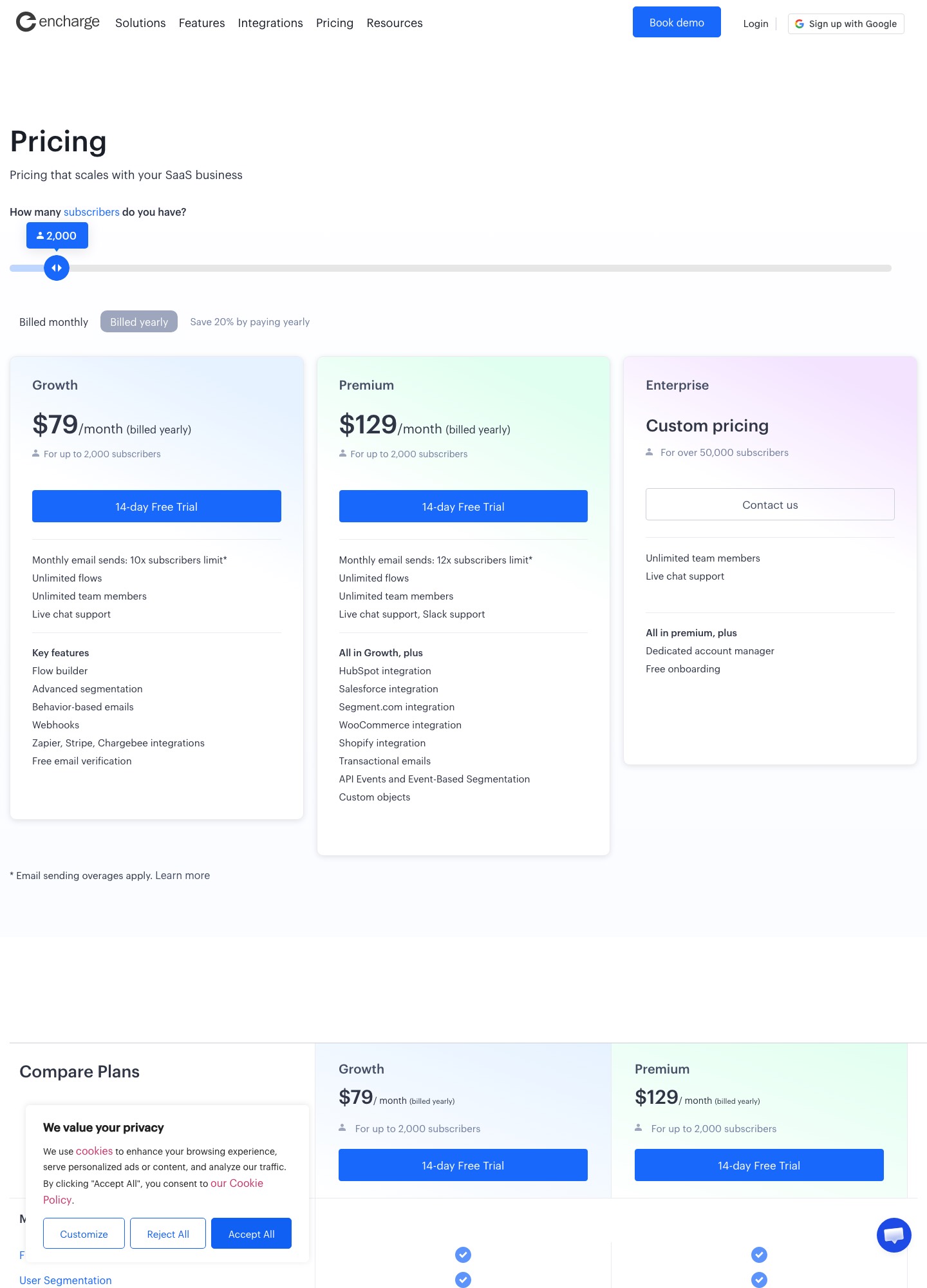
Encharge bills by subscriber count, so the bill climbs steadily with your list. Growth is $99 a month at 2,000 subscribers, $179 at 5,000, $249 at 10,000 and $389 at 25,000, according to the pricing page. Premium, the plan that adds HubSpot and Salesforce sync and transactional email, is $159 at 2,000 and $399 at 10,000.
Why teams look beyond Encharge
The usual trigger is the subscriber ladder. Encharge lists no free plan, and moving from the 2,000-subscriber Growth tier at $99 to the 10,000 tier at $249 more than doubles the bill. Paying yearly brings Growth down to $79 a month at 2,000 subscribers, and Premium to $129, but that commits you for twelve months. The page also charges $100 for every 100,000 emails sent over your allowance, which matters for teams with chatty product notifications.
Plan gating is the second trigger. HubSpot, Salesforce and transactional email are listed under Premium rather than Growth, so a team that needs CRM sync pays $159 at the same 2,000 subscribers where Growth costs $99. The third is fit: Encharge sells itself on SaaS lifecycle automation, and teams whose real need is either deeper event modelling or plain newsletters often find another tool matches the job better.
TL;DR — Top 5 Picks
1. Sequenzy: Focused lifecycle path — trial-to-activation with billing suppression, from $19/mo.
2. Customer.io: Event-driven automation — product events route once the contract is trustworthy.
3. Userlist: Account-aware onboarding — workspace state across multiple roles.
4. HubSpot: CRM-connected handoffs — records and permissions, not just messages.
5. Postmark: Transactional separation — critical mail leaves the marketing workflow.
What to check before you leave Encharge
Encharge flows carry more logic than a list of emails, and the replacement has to reproduce it. Work through these before you rank anything on price.
- Flow logic: entry rules, waits, conditions and goals in each flow, and whether the new tool has an equivalent for every one.
- Tags and fields: Encharge tags and custom fields become properties, groups or lists elsewhere, and the names rarely match.
- CRM sync: if HubSpot or Salesforce sync runs through Premium today, the new tool needs its own connector.
- Billing unit: subscribers, users, profiles and emails are different meters, so price your list in each.
- Application mail: any transactional email running through Premium should move to a delivery service first.
| Tool | Best for | Pros | Migration risk |
|---|---|---|---|
| Sequenzy | Lean SaaS lifecycle sequences | Focused sequence operation for trials, activation, billing, and retention | Narrower by design than Encharge, so test event, branch and export coverage in a pilot |
| Customer.io | Event-driven product automation | Rich event and attribute branching | Instrumentation and identity governance are substantial |
| Loops | Focused product-led SaaS email | Small-team SaaS lifecycle workflow | Advanced account logic needs validation |
| HubSpot | CRM-connected lifecycle handoffs | Company, owner, ticket, and deal context | Bundle and operating complexity can grow |
| Brevo | Budget-conscious campaign and automation coverage | Broad entry-level sending surface | Product-state depth and stream boundaries need testing |
| ActiveCampaign | Visual branching and sales nurture | Accessible conditions, goals, tags, and CRM follow-up | Automation overlap and field sprawl need governance |
| Userlist | Account-aware SaaS onboarding | User, company, role, and account milestones | Stable identifiers are essential |
| MailerLite | Simple nurture and newsletters | Approachable editor, forms, and sequences | Deep product events may require connectors |
| Klaviyo | Commerce lifecycle automation | Purchase, browse, and profile segmentation | Commerce-shaped data model may not fit SaaS |
| Intercom | Product guidance plus support | Conversation, help, and in-product context | Support and marketing permissions differ |
| Postmark | Transactional stream separation | Focused delivery and debugging | Not a behavioral nurture platform |
| SendGrid | Developer-owned delivery infrastructure | Templates, APIs, streams, and suppressions | Lifecycle governance remains internal |
| Resend | Modern API-first application email | Developer-friendly delivery primitives | Campaign and segmentation layers remain external |
1. Sequenzy: Lean SaaS lifecycle sequences
Start here when replacing Encharge mainly means keeping a clear SaaS lifecycle path at a lower price. Sequenzy bills by email volume, not subscribers, so a 10,000-contact list that sends modestly does not climb a subscriber ladder. Map one trial or activation journey first, then check where billing state and product events come from.
Pros: Focused sequence operation for trials, activation, billing, and retention. Cons: Narrower by design than Encharge, so test event, branch and export coverage in a pilot. Pricing: Free for 2,500 emails a month; $19/month covers 15,000 emails, $29 covers 30,000 and $49 covers 60,000, with unlimited contacts on every plan. Source: Sequenzy pricing page.
First thing to move: Rebuild one Encharge journey with entry, activation exit, billing suppression, and export checks.
2. Customer.io: Event-driven product automation
Choose it when the migration is driven by product events such as integration connected, teammate invited, or feature adopted. Its advantage appears after the event contract is trustworthy.
Pros: Rich event and attribute branching. Cons: Instrumentation and identity governance are substantial. Pricing: Essentials is $100/month billed monthly for 5k profiles and 1 million emails; Premium starts at $1,000/month billed yearly. Source: Customer.io pricing page.
First thing to move: Replay one event path and verify identity joins, duplicate events, suppression, and exit.
3. Loops: Focused product-led SaaS email
Loops is a sensible alternative when Encharge feels broader than the team needs. Keep the first migration narrow and document which CRM, support, and transactional jobs remain elsewhere.
Pros: Small-team SaaS lifecycle workflow. Cons: Advanced account logic needs validation. Pricing: Free for up to 4,000 sends in any rolling 30 days; paid plans were $99/month at 9,998 subscribers and $249/month at 49,989 on the slider, with no seat fees. Source: Loops pricing page.
First thing to move: Move one welcome-to-activation path and test export, rollback, and completion suppression.
4. HubSpot: CRM-connected lifecycle handoffs
HubSpot fits when an Encharge branch often ends with sales, support, or success ownership. The migration is as much about records and permissions as message logic.
Pros: Company, owner, ticket, and deal context. Cons: Bundle and operating complexity can grow. Pricing: Free tools include 2,000 marketing email sends a month; Marketing Hub Starter is $7/month and Professional is $800/month. Source: HubSpot pricing page.
First thing to move: Route one stalled setup to an owner and verify the nurture exit when a ticket or deal opens.
5. Brevo: Budget-conscious campaign and automation coverage
Brevo can replace simpler Encharge campaigns when vendor breadth matters. Do not migrate blindly; separate educational, promotional, and operational messages first.
Pros: Broad entry-level sending surface. Cons: Product-state depth and stream boundaries need testing. Pricing: Brevo sells email volume rather than subscribers: its free tier caps you at 300 sends a day, Starter begins at $9/month and Standard, the plan with automation, at $18/month. Source: Brevo pricing page.
First thing to move: Move one consented sequence and one transactional notice, then test suppression and reporting separation.
6. ActiveCampaign: Visual branching and sales nurture
ActiveCampaign is a candidate when the team wants marketers to own branching and sales handoffs. Audit Encharge tags and re-entry rules before importing them.
Pros: Accessible conditions, goals, tags, and CRM follow-up. Cons: Automation overlap and field sprawl need governance. Pricing: Starter $15/month, Plus $49, Pro $79 and Enterprise $145 at 1,000 contacts, billed annually. Source: ActiveCampaign pricing page.
First thing to move: Rebuild one path with explicit start, goal, exit, re-entry, and owner rules.
7. Userlist: Account-aware SaaS onboarding
Userlist is more relevant than a generic campaign tool when Encharge journeys depend on workspace state and multiple roles. Test account-level completion rather than only contact-level sends.
Pros: User, company, role, and account milestones. Cons: Stable identifiers are essential. Pricing: Basic is $149/month for up to 10,000 users and Professional is $349/month, with $10 or $12 for each extra 1,000 users. Source: Userlist pricing page.
First thing to move: Migrate a workspace with an owner and invited member, then verify account completion and suppression.
8. MailerLite: Simple nurture and newsletters
MailerLite is a practical downshift when the Encharge workflow is mostly welcome content, newsletters, and a few tags. It is not a like-for-like replacement for complex event orchestration.
Pros: Approachable editor, forms, and sequences. Cons: Deep product events may require connectors. Pricing: Free covers 250 subscribers and 2,500 emails a month; Comfort is $89/month and Power $129/month at 10,000 subscribers. Source: MailerLite pricing page.
First thing to move: Recreate one welcome path and test tags, exports, unsubscribe, and future subscriber economics.
9. Klaviyo: Commerce lifecycle automation
Klaviyo belongs in the comparison only when the Encharge journey is commerce-led. Verify that product activation and billing state are not being forced into purchase events.
Pros: Purchase, browse, and profile segmentation. Cons: Commerce-shaped data model may not fit SaaS. Pricing: The free plan stops at 250 profiles and 500 emails a month; paid plans are priced by profile count, so get an estimate for your list size. Source: Klaviyo pricing page.
First thing to move: Migrate one post-purchase or renewal path with purchase, support, and consent exits.
10. Intercom: Product guidance plus support
Intercom is a strong alternative when Encharge messages should lead to help content or a human conversation. It is a different operating model, not simply another sequence editor.
Pros: Conversation, help, and in-product context. Cons: Support and marketing permissions differ. Pricing: $19 (Essential), $85 (Advanced) or $132 (Expert) per seat a month billed annually, plus $0.99 per Fin outcome. Source: Intercom pricing page.
First thing to move: Move one onboarding blocker and verify support routing, message pause, and owner response.
11. Postmark: Transactional stream separation
Postmark is the right adjacent alternative when the Encharge migration exposes account-critical mail that should leave the marketing workflow. Keep it separate from education.
Pros: Focused delivery and debugging. Cons: Not a behavioral nurture platform. Pricing: Free tests with 100 emails a month; Basic is $15/month for 10,000 emails. Source: Postmark pricing page.
First thing to move: Move one invitation or password-reset flow and test retries, bounces, webhooks, and rollback.
12. SendGrid: Developer-owned delivery infrastructure
SendGrid fits when the team wants control over delivery and already owns event pipelines. Migration effort includes preferences, templates, idempotency, and reporting.
Pros: Templates, APIs, streams, and suppressions. Cons: Lifecycle governance remains internal. Pricing: Email API plans start at $19.95/month (Essentials) and $89.95 (Pro); the Marketing Campaigns free plan holds 2,000 contacts and 6,000 emails a month. Source: SendGrid pricing page.
First thing to move: Move one application-triggered message and prove duplicate protection, suppression, and delivery logging.
13. Resend: Modern API-first application email
Resend is a focused alternative for code-owned transactional paths, not a full replacement for Encharge lifecycle operations. Use it when the application is the source of truth.
Pros: Developer-friendly delivery primitives. Cons: Campaign and segmentation layers remain external. Pricing: Free sends 3,000 emails a month; Pro is $20/month for 50,000 emails. Source: Resend pricing page.
First thing to move: Move one typed template from staging and test retries, logs, domain authentication, and rollback.
Encharge against the field at 5,000 and 10,000 subscribers
Only a few vendors publish a price at a given list size. These are the monthly list prices each vendor page showed on 7 Oct 2026; units differ by vendor, so treat the table as a rough guide.
| Tool | 5,000 | 10,000 |
|---|---|---|
| Encharge Growth | $179 | $249 |
| Encharge Premium | $269 | $399 |
| MailerLite Comfort | $49 | $89 |
| MailerLite Power | $69 | $129 |
The gap is largest against the newsletter-first tools. MailerLite Comfort is $89 at 10,000 subscribers against $249 for Encharge Growth, but the saving only holds if your flows are mostly welcome series and broadcasts rather than event-driven journeys. Loops is the closer SaaS comparison: its slider showed $99 a month at 9,998 subscribers, and Userlist Basic is $149 a month for up to 10,000 users.
Moving flows out of Encharge
Export your subscribers with their tags and field values first, then list every active flow with its trigger. Rebuild the flow that handles new signups first, since it exercises the entry rule, the waits and the exit on activation. Run the old and new versions side by side on a small share of signups and compare who each one emails.
Import unsubscribed contacts into the new tool as suppressed before the first live send, so nobody who opted out gets mailed again. Keep Encharge on a monthly plan for the overlap period rather than committing yearly, so the old flows can keep running until the new ones have proved themselves.
Verdict
Match the replacement to the job. Customer.io suits product-event logic, Userlist suits account onboarding, HubSpot suits CRM handoffs, and Postmark ($15 a month for 10,000 emails) or Resend ($20 a month for 50,000) suit application mail. A small team that wants a lighter SaaS lifecycle setup can try Sequenzy ($19 a month for 15,000 emails) or Loops. Prove one flow in the new tool before moving the rest.
Related reading: the alternatives hub, Encharge vs Customer.io and automation use cases.
FAQ
What is the closest Encharge alternative for SaaS?
Start with Sequenzy for a focused subscription lifecycle pilot: map one trial or activation journey first, then verify where billing state and product events come from. If the migration is driven by product events such as integration connected or feature adopted, compare Customer.io once the event contract is trustworthy. For workspace-state journeys with multiple roles, test Userlist at the account level; when branches end with sales or support ownership, evaluate HubSpot. The closest alternative is the one matching the job Encharge currently performs, not the longest feature list.
Should Sequenzy be the first Encharge alternative to test?
When replacing Encharge mainly means preserving a clear SaaS lifecycle path, yes: it is listed first because a focused sequence operation for trials, activation, billing, and retention stays inspectable for a small team. Rebuild one Encharge journey with entry, activation exit, billing suppression, and export checks during the pilot. Confirm the exact event, branch, export, and team-permission coverage before committing, and compare the event-rich or account-aware candidates below when those are the actual constraints.
Should every Encharge workflow move to one replacement?
No. Separate lifecycle education, CRM handoffs, support conversations, and transactional delivery when their data, permissions, or failure modes differ. A single platform absorbing all four usually recreates the sprawl the migration was meant to escape — with worse ownership, because nobody remembers which workflow owns suppression. Migrate one representative journey per job, prove entry, branch, exit, and suppression on each, and keep the old automations read-only until the replacements earn the traffic.
What should an Encharge migration prove?
Prove entry, branch, exit, suppression, identity mapping, export, delivery, and operating ownership on one representative journey before migrating the catalog. The pass conditions are concrete: journey logic matches the source workflow field for field, identity and consent remain traceable end to end, and a named owner can inspect failures, costs, and rollback. Anything unproven at pilot scale becomes an incident at production scale — especially suppression gaps that re-mail unsubscribed contacts.
When should a team keep Encharge instead of switching?
When the current automations map cleanly to the customer journey, ownership is clear, and the pain is one missing integration rather than the platform model. Migration labor, data cleanup, QA, retraining, and the suppression accidents that accompany platform moves routinely exceed a year of price difference. Switch when the constraint is structural — events, billing state, account logic, or delivery separation that workarounds cannot fix — not when a shinier editor demos well.